


Microsoft 365 Solutions

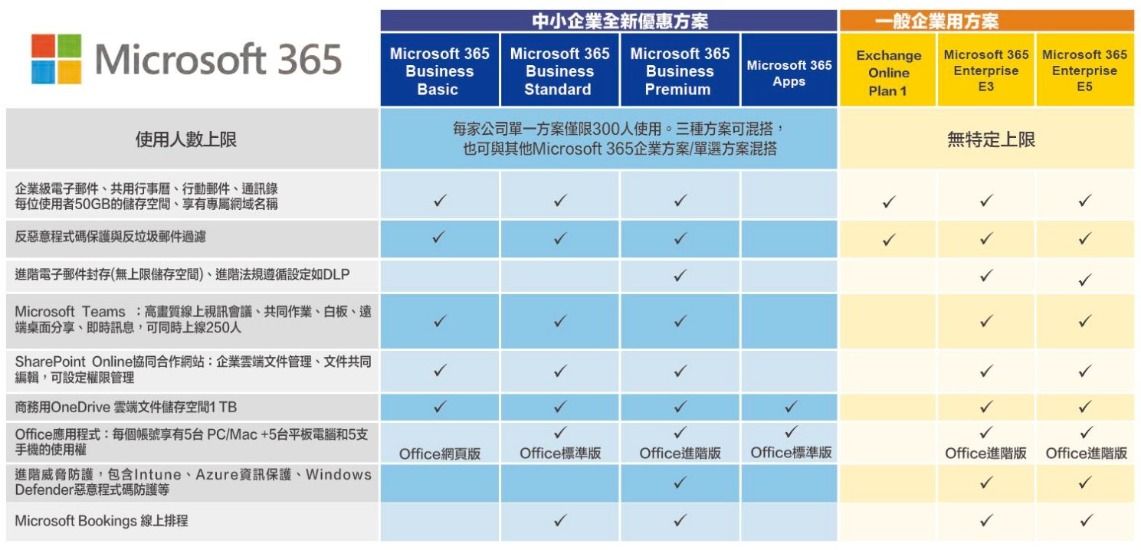
Microsoft 365 is a cloud-based subscription plan for Microsoft's enterprise productivity and collaboration tools. It allows businesses to immediately access information services that large enterprises have invested in and built themselves, without incurring huge hardware investments, software implementation, and management costs.
Cloud hard drive space
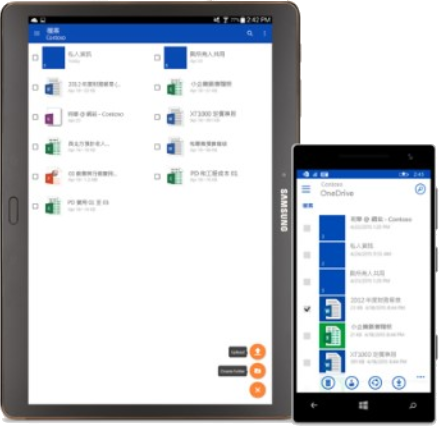
In other words, OneDrive is for business use, offering up to 1TB of storage. It provides enterprise users who only need space to store employee company documents or files, without requiring team collaboration, with apps for various mobile devices for file access and editing.
Office software service subscription
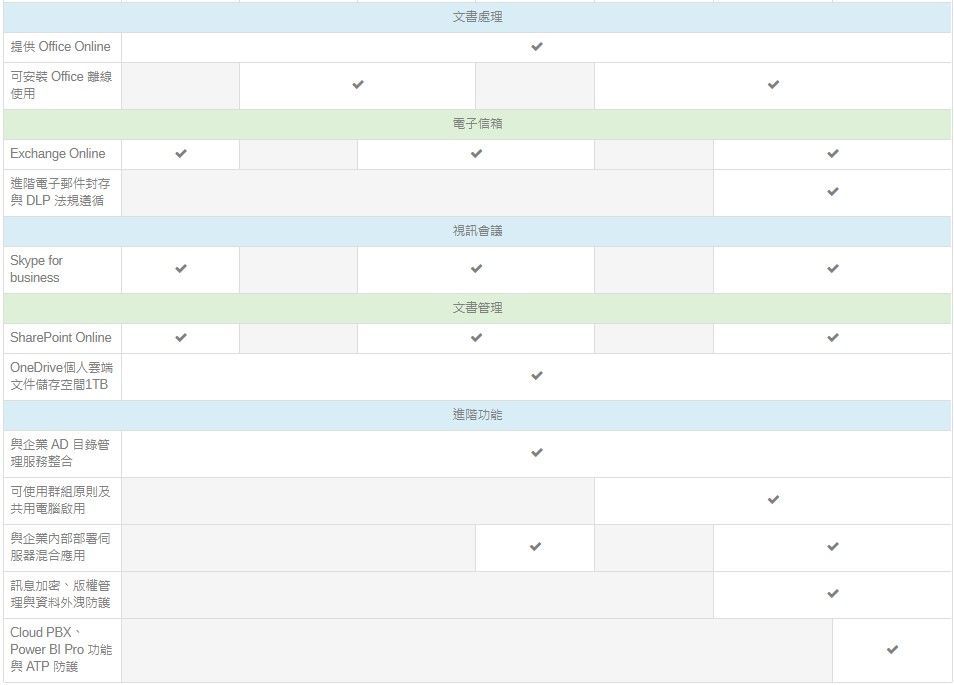
Each account can download and install Office on up to 5 PCs/Macs for offline use. Enjoy the familiar Office experience on devices across different platforms.
Document repository, collaborative website
SharePoint Online is a cloud-based collaborative website that can also be used as a project management website. It allows for access control, cross-device file synchronization, collaborative editing, and sharing with others based on permissions.
Enterprise community services
Yammer restricts access to only those within the same or trusted domain, ensuring security. Yammer lets you find answers faster, brainstorm with anyone, and make quick decisions. There are no limitations on file format, storage space, or mobile device usage.
Multi-point online conferencing service
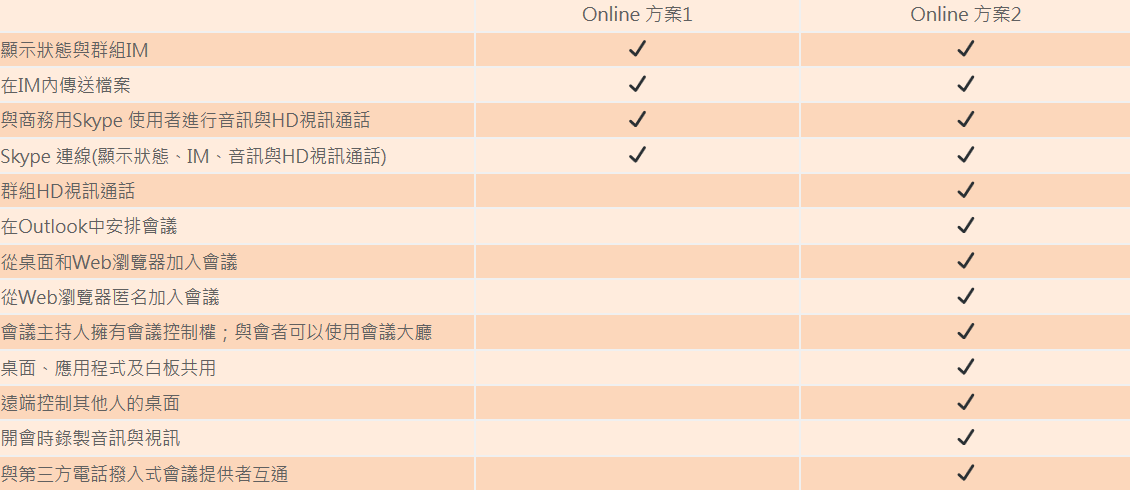
Skype for Business offers features such as multi-party instant messaging, voice calls, high-resolution multi-party video conferencing, remote desktop sharing, application sharing, and whiteboard presentations/discussions.
Enterprise email service
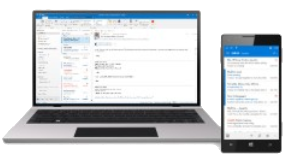
Exchange Online offers a massive 50 GB mailbox for email, calendar, and corporate address book access and synchronization across platforms. It boasts professional-grade spam and malware protection and uses your domain name to send emails.
Cloud hard drive space
In other words, OneDrive is for business use, offering up to 1TB of storage. It provides enterprise users who only need space to store employee company documents or files, without requiring team collaboration, with apps for various mobile devices for file access and editing.
OneDrive for Business Cloud Storage
5 key features
Empowering small businesses
Low cost
You can use powerful cloud storage without purchasing any hardware.
Cross-device
Whether it's a Windows Phone, iPhone, Android, or Blackberry device, you can enjoy the convenience of mobile access.
Stronger backup
Built-in security mechanisms, compliant with the latest standards, guaranteeing 99.9% SLA, and 24-hour customer service and technical support.
Large capacity
Each user has 1TB of cloud storage space online, which can be shared anytime via the internet.
Easy Sharing
Efficiency is further enhanced by enabling real-time online sharing and collaborative document writing.
Exchange Online Cloud Mailbox
5 key features
Empowering small businesses
Low cost
You can use a large amount of email space without purchasing any hardware.
cross device
Whether it's a Windows Phone, iPhone, Android, or Blackberry device, you can enjoy the convenience of mobile access.
Stronger backup
Data is stored in an ISO 27018 compliant data center, supporting off-site backup and disaster recovery capabilities.
Large capacity
A 50GB enterprise-grade email account means you'll never have to worry about your inbox overflowing, allowing you to focus on your business.
Easy Sharing
It has a built-in, comprehensive spam blocking and anti-virus mechanism.
Comparison of Exchange Online and regular managed mail
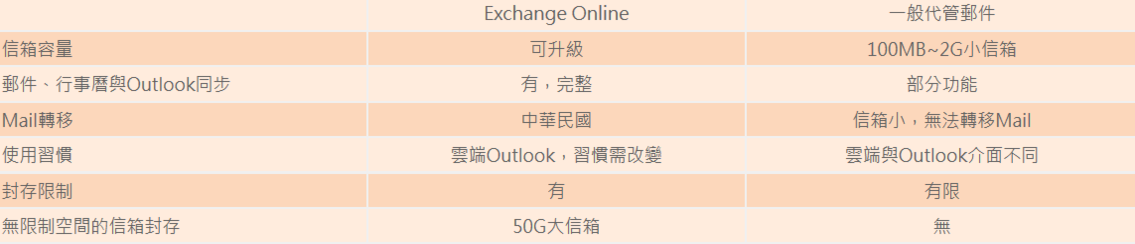
Comparison of Exchange Online and regular managed mail
This is paragraph text. Click it or hit the Manage Text button to change the font, color, size, format, and more. To set up site-wide paragraph and title styles, go to Site Theme.
reliability
Backed by strong financial resources, our Service Level Agreement (SLA) guarantees 99.9% uptime, giving you peace of mind.
System Management
The system management portal offers detailed IT configuration options for your services, both via the online portal and through automated management tasks using PowerShell commands. You can also manage your services anytime, anywhere using the system management application.
Security
It provides advanced security measures with five layers of protection and proactive monitoring to help ensure the security of customer data.
Stay up-to-date
You do not need to pay for upgrades; updates are included in your subscription. Office 365 customers can configure IT to receive new features regularly as needed.
Privacy
Your information is your personal property. We will ensure its security and protect your privacy.
Active Directory Integration
Manage user authentication and permissions. Implement single sign-on via Active Directory.
support
We offer 24/7 telephone support for all types of IT issues. For less urgent problems, you can submit a service request directly through the system management portal.