


Microsoft

Chuan Ta has been a licensed distributor of Microsoft Embedded software since 2001, a total of 24 years. The licensed software includes...
Embedded operating system:
This is a suite of operating systems designed by Microsoft for embedded systems and IoT environments, bringing enterprise-grade functionality, security, and management capabilities to the Internet of Things. It leverages Windows' embedded experience, ecosystem, and cloud connectivity to enable industry organizations to quickly build the IoT environments they need, including rapid deployment, easy management, and seamless cloud connectivity.
Learn more about Windows 11 IoT Enterprise LTSC 2024
Learn more about Windows 11 IoT Enterprise
Learn more about Windows 10 IoT Enterprise LTSC 2021
Learn more about Windows 10 IoT
Windows Embedded StandardWindows Embedded ProWindows Embedded POSReadyWindows Embedded CompactWindows Server IoT 了解更多
SQL Server IoT
(Microsoft SQL Server IoT has the same features and functionality as Microsoft SQL Server, but it can only be legally licensed through OEM channels.) https://www.microsoft.com/zh-tw/WindowsForBusiness/windows-iot
Learn more about Microsoft part numbers, including lifecycle end date, support end date, part number, part name, and COA type.
Please refer to the Microsoft embedded software product lifecycle and Microsoft embedded software product part numbers.
Windows IoT Short Film Summary:
https://learn.microsoft.com/zh-tw/shows/azure-videos/an-introduction-to-windows-iot
Windows Embedded & Windows IoT compatible devices:
It is suitable for central control units, fuel dispensers, queuing machines, ordering machines, KIOSK, PLC, HMI and other industrial automation systems, medical devices, ATMs, POS machines, simplified computers and other fixed-purpose devices in community commercial and office buildings.
IoT Device Catalog:
The benefits of being certified by Microsoft Azure IoT include having your company logo and devices displayed on Microsoft's official website, thereby increasing the global visibility of your products and making it easy for international customers to find IoT device solutions compatible with the Microsoft cloud.
https://devicecatalog.azure.com/
Service category:
Microsoft SQL Server (Embedded Library) https://www.microsoft.com/zh-TW/sql-server/
Windows 10 IoT LTSC Edition / Windows 11 IoT GAC Edition Buying Guide
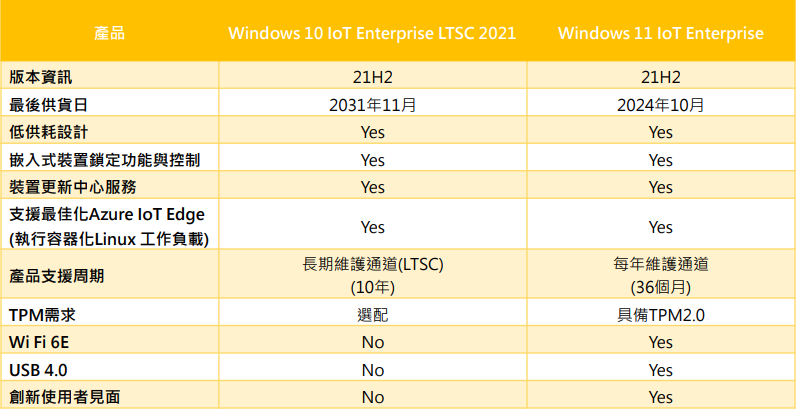
Note: Windows 10 IoT Enterprise 2021 LTSC is the last LTSC version of Windows 10, and no further versions will be released.
Windows 10 IoT / Windows 11 IoT Product Roadmap
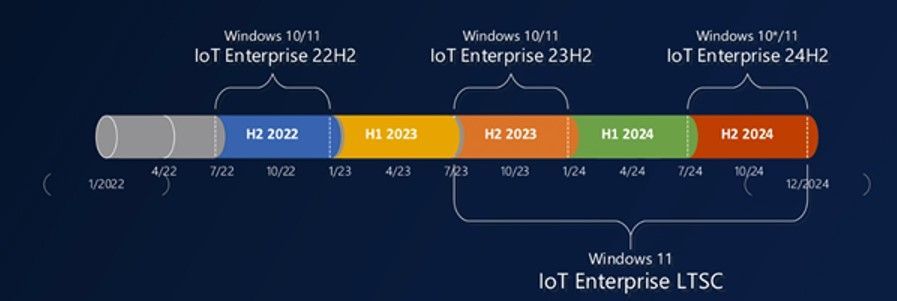
Product Roadmap
Frequently Asked Questions (FAQs):
Windows Embedded/Windows IoT is a family of products designed for dedicated devices, providing enterprise users with highly customized and modular solutions. With a product lifecycle of up to 10 years, it enables businesses to utilize more cost-effective and specialized dedicated devices to perform their daily operations and improve efficiency. Windows Embedded Compact is the smallest and most flexible product in the entire Windows Embedded/Windows IoT family, designed for devices requiring high performance and flexible processor choices, and supports both x86 and ARM architectures.
Windows Embedded/Windows IoT Licensing Process: Phase 1: Pre-sales; Phase 2: Signing OEM CLA; Phase 3: Sales Preparation; Phase 4: Sales; Phase 5: Delivery.
#606060
Windows Embedded / Windows IoT Software Licensing Q&A:
Operating System Licensing FAQs
Q7: What is a Field Upgrade license? A7: A Field Upgrade License allows embedded devices already installed on end users to upgrade their Microsoft operating systems locally. For example, a Brazilian supermarket chain customer whose existing POS devices use Intel Core i3 processors and Windows Embedded Standard 8 operating systems could purchase a license for either Win 10 IoT Enterprise 2019 LTSC MultiLang ESD OEI Upgrade Value EPKEA or Win 10 IoT Enterprise 2019 LTSC MultiLang ESD OEI Upgrade Value if they wish to upgrade locally.
Note:
- The license fee for a Filed Upgrade License is equivalent to the license fee for the operating system upgrade; for example, the license fee for Win 10 IoT Ent 2019 LTSC MultiLang ESD OEI Upgrade Value EPKEA is the same as that for Win 10 IoT Ent 2019 LTSC MultiLang ESD OEI Value EPKEA.
- The Filed Upgrade License will not include a product key.
- When purchasing a Field Upgrade License, you will generally not receive an additional license sticker; instead, you will receive an envelope like the one shown below.
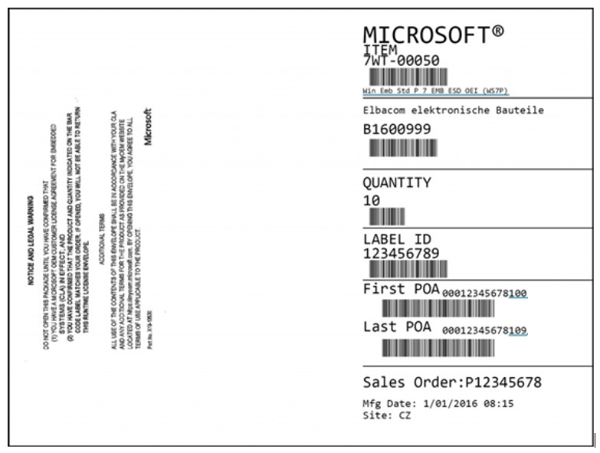
Q8: The customer's application can only run on operating systems that have reached end-of-life (EOL), such as Microsoft Windows Embedded Standard 2009 (WES).
How can I exercise my Downgrade Rights?
According to the definition in Section 10 of the Microsoft CLA 7.0 Program Execution Guide effective Mar 2022 - Clean (microsoft.com), the customer
You should purchase a license for the most recent high-end version of this series. For example, if you want to downgrade to Microsoft Windows Embedded Standard 2009 (WES),
The latest high-level version licenses for 2024 include...
Windows 10 IoT Enterprise 2021 LTSC High End 及 Windows 11 IoT Enterprise High End
Therefore, the authorization that the customer needs to purchase is
Windows 10 IoT Enterprise 2021 LTSC High End 或 Windows 11 IoT Enterprise High End
And affix its authorized sticker to the system device.
For the product key, customers only need to use their existing Microsoft Windows Embedded Standard 2009 (WES) key to complete the boot process.
Downgrade Rights Procedure. Q9: How to choose when purchasing a Windows 10/11 IoT Enterprise license?
A9: The license purchase fee depends on the device's CPU hardware specifications, covering manufacturers such as Intel, AMD, and Qualcomm, and can be divided into high-end and low-end categories.
High-end, Value, Entry, and Base are provided for the NXP platform. For a detailed list of CPUs, please contact Quanta International.
Certificate of Authenticity (COA)
Q1: What is a Certificate of Authenticity (COA)? A1: A Certificate of Authenticity (COA) is a label that helps identify genuine Microsoft software. When you purchase a Microsoft Windows Embedded/Windows IoT Runtime License, you will receive a "COA" label designated by Microsoft to identify genuine products. The "COA" label contains the product serial number and has anti-piracy features. OEM customers should purchase a license for the Microsoft embedded operating system before the product leaves the factory and permanently affix the "COA" label to a prominent location on the product. Affixing the "COA" label indicates that the device has a genuine embedded operating system installed. Each embedded device has a corresponding "COA" label to identify its authenticity. Q2: Why choose a computer/machine/device with a Certificate of Authenticity (COA)? A2: A computer/machine/device with a Certificate of Authenticity (COA) indicates that the embedded operating system installed on that computer/machine/device is legally licensed software. The value you gain by choosing genuine software includes:
- Protect from virus threats: Embedded-specific features such as transparent process write filtering protection lock and protect the system from intrusion, effectively ensuring the security of embedded device systems.
- Ensuring stable system operation: Developing customizable operating systems, providing greater security, stability, and high quality, and genuine Windows Embedded/Windows IoT giving genuine users higher software ownership value.
- Development technical support: Genuine Windows Embedded/Windows IoT licenses provide technical support from Microsoft and its resellers, helping customers bring their products to market faster and better.
- 10 Years of Service Support: Genuine Windows Embedded/Windows IoT boasts robust and reliable stability, free from system vulnerabilities caused by tampering and cracking. Furthermore, timely after-sales support from Microsoft and authorized partners ensures an efficient, reliable, and stable user experience!
- Protect your business reputation: Genuine Windows Embedded/Windows IoT licenses help protect your intellectual property and mitigate legal risks.
Q3: How to identify the Certificate of Authorization (COA) sticker for Windows Embedded/Windows IoT? A3: COA Location: The COA label should be affixed to a prominent location on the embedded device, clearly visible and not easily damaged. COA Anti-counterfeiting: The color-changing anti-counterfeiting line repeatedly displays the words "MICROSOFT CERTIFICATE OF AUTHENTICITY".
Two types of COA in the OEM channel
- Embedded Standard (Windows Embedded Enterprise/POS) COA:
(Note: Microsoft changes sticker designs from time to time. Please refer to the latest version for the most up-to-date information.)
PKEA (Product Key Application) 5x5 Single Activation Key (Traditional One-to-One Key). Each device has a single, unique key, printed on an authorization sticker.
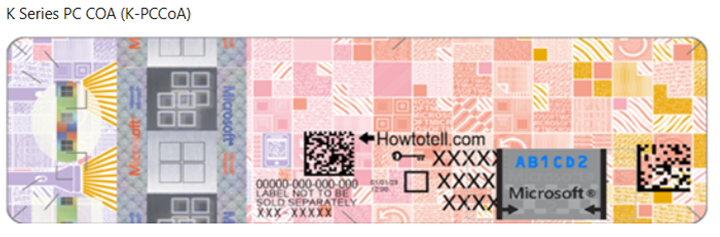
2. Embedded Abbreviation (Windows Embedded Standard/CE)
(Note: Microsoft changes sticker designs from time to time. Please refer to the latest version for the most up-to-date information.)
EPKEA (Embedded PKEA)
Multiple-initiation keys (one-to-many keys). One set of keys can activate multiple devices (maximum activation: 50,000 times), facilitating large-scale deployments.
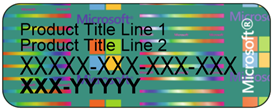
Q4: Can the COA label be transferred from an old machine to a new machine? A4: No, the COA label is proof of authorization for each individual embedded machine, so it cannot be transferred to other different machines or new machines.
Windows Embedded/Windows IoT 產品
Q1: Why Windows Embedded/Windows IoT? A1: Windows Embedded/Windows IoT is a family of customized operating systems for dedicated devices. Its mission is to extend the capabilities of Windows and cloud computing to the world of dedicated devices. Windows Embedded/Windows IoT can help device manufacturers shorten time-to-market and improve device performance; at the same time, it can help users improve efficiency and customer satisfaction. Windows Embedded/Windows IoT is widely used in tens of thousands of smart devices, including Thin Clients, POS machines, ATMs, kiosks, digital signage, in-vehicle and navigation devices, industrial control, security equipment, and medical devices. It covers important industries such as finance, services, retail, industrial automation, healthcare, and transportation, and tailors the most cost-effective solutions to meet specific customer needs.
Microsoft Windows Embedded/Windows IoT 授權
For enterprise users, they can directly purchase dedicated machines or devices pre-installed with Microsoft embedded systems from OEMs.
Phase 1: Pre-sales
Phase Two: Signing the OEM CLA
The OEM Pre-installed Kit (OPK) includes a suite of operating systems that are installed via a standard wizard experience such as Windows Embedded Enterprise. This kit also includes deployment tools to assist with the manufacturing process.
Phase Three: Preparing for Sales
Runtime licensing allows OEMs to replicate images of Embedded Licensed products across their Embedded Systems product line. After ordering a Runtime license, the OEM will receive Product-Related Documentation (APM) from the reseller. APMs are product-related documentation that Microsoft designates as part of a product at any time. Examples of APMs include documentation, external media containing software and other physical data related to the product. APMs do not include Certificates of Account (COAs). A Runtime license is required for each Embedded System distributed.
Phase Four: Sales
Runtime licenses, when used for OPK-style toolkits, are alphanumeric strings located on the COA; assigned to each Microsoft product to provide a unique identifier for that product. When used for PID-style toolkits, the PID is located on a card sent with the COA. The number on the COA for these kits is merely a serial number. Runtime keys are used to verify specific embedded system product lines and update their image files.
Phase 5: Delivery
A Certificate of Authenticity (COA) serial number label is affixed to devices containing embedded Microsoft operating systems. The COA is a primary anti-piracy tool, product tracking tool, and authorization certificate. The product's specific name is printed on the label.
The License Terms (formerly known as the User License Agreement EULA) are the terms and conditions that must be communicated to the user and will be packaged with the OEM's device upon shipment.